If you've ever felt like your home office is working against you, you're not alone. The secret to transforming it from a source of stress into a hub of productivity isn't complicated. It really boils down to a simple, practical flow: first, define your space and declutter with intention, then create a functional layout with smart work zones, and finally, select furniture and systems that solve your specific problems.
Your Blueprint for a Productive Home Office
Having a well-organized home office has shifted from a "nice-to-have" to a necessity for focus and well-being. With so many of us in remote or hybrid roles, carving out an effective workspace at home is a common challenge. In fact, it's projected that by 2025, over 32.6 million people will be working remotely, making dedicated, organized spaces more crucial than ever.
The stakes are higher than you might think. Some studies even suggest that disorganized environments can reduce focus by as much as 40%, directly impacting your daily output and mental clarity. This guide is designed to move you beyond just tidying up. We're going to tackle the core issues of clutter, distraction, and discomfort that drain your energy, step-by-step. Before you start, it’s worth understanding the profound importance of a dedicated work-from-home space.
This isn't about chasing a sterile, picture-perfect office. It’s about building a practical workspace that genuinely supports how you work.
The 5 Pillars of Home Office Organization
To give you a clear roadmap, we've broken down the process into five foundational pillars. Think of this as your game plan. Each step logically builds on the last, helping you create a comprehensive system for lasting organization and a more productive workday.
| Pillar | Primary Goal | Key Action |
|---|---|---|
| Planning & Decluttering | Create a clean slate and clear vision. | Sort items into keep, donate, or discard piles. |
| Layout & Zoning | Design a workflow-friendly space. | Assign specific areas for tasks like computer work, supplies, and reference. |
| Furniture Selection | Solve problems with functional pieces. | Choose a desk, chair, and storage that fit your needs and space. |
| Systems & Ergonomics | Enhance comfort and efficiency. | Manage cables and adjust your setup for proper posture. |
| Styling & Maintenance | Personalize and sustain your setup. | Add decor and establish simple daily/weekly tidying routines. |
With these pillars as our guide, let's dive in and start building an office that truly works for you.
Clearing the Clutter Before You Build
Before you can even think about new desks or storage solutions, you have to address what’s already in the room. Trying to set up a functional office around piles of existing clutter is a recipe for failure—it’s like trying to paint over a cracked wall. You’re just hiding the problem, not fixing it.
The most important first step is a thorough decluttering session. This isn't just about tidying up; it's about making deliberate decisions to create a clean slate. Getting a handle on this process is key, and there's actually a practical guide on how to declutter your home that breaks it down well.
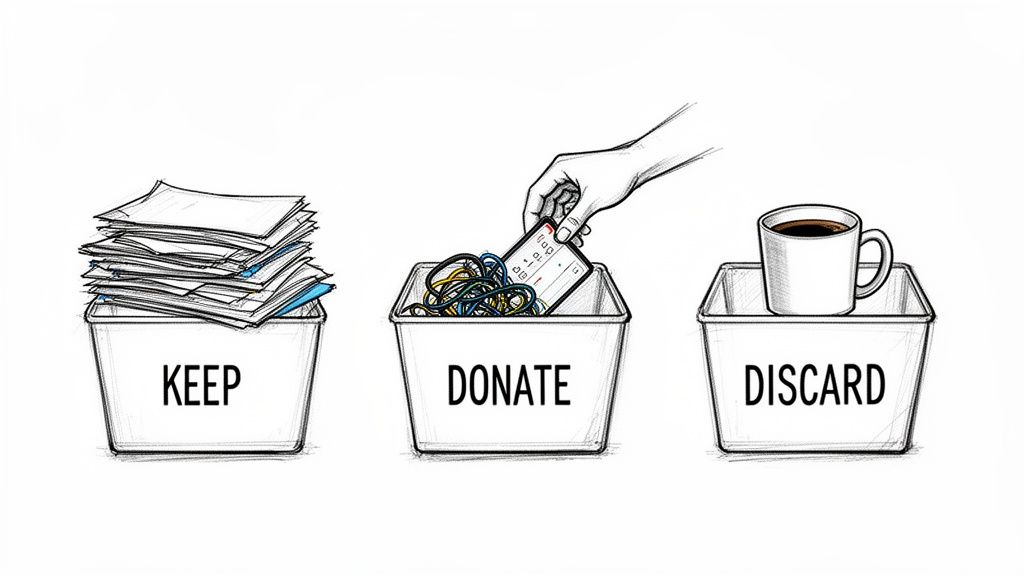
To start, grab three boxes or bins and label them: Keep, Donate, and Discard.
The Three-Bin Sorting Method
As you pick up every single item in your office—from pens to paperwork to that unused gadget you bought three years ago—you have to make a call right then and there. No "maybe" pile. That's just procrastination in disguise.
Keep: This pile is only for things you use regularly and are essential for your work. Your main laptop, your go-to notebook, critical documents. If it directly helps you get things done, it can stay.
Donate: What's still perfectly good but you just don’t need? That old monitor, extra binders you never opened, or business books you've already read. These items can find a new life somewhere else.
Discard: Now for the satisfying part. This is for the broken electronics, the collection of dried-up pens, and outdated paperwork that needs to be shredded. It's time to reclaim your space.
A useful rule of thumb: if you haven't touched an item in the past year, it's a prime candidate for the donate or discard pile. This helps you detach emotionally and makes it much easier to let things go.
Don't Forget the Digital and Paper Clutter
Your physical space is only half the battle. Digital clutter can be just as distracting. A desktop covered in random files or an inbox with thousands of unread emails creates mental noise. Set aside an hour to create a logical folder system and clean up your digital world. A tidy screen leads to a focused mind.
And then there's the paper. Stacks of it can feel suffocating. Many people have found freedom by going paperless—scanning important documents and saving them digitally. Not only does this clear off your desk, but finding what you need becomes much faster. For the hard copies you absolutely have to keep, a simple filing cabinet is essential.
Once you’ve cleared everything out, the trick is to keep it that way. The “one-touch rule” for anything new that comes into the office is a helpful habit. Deal with mail, notes, and files the moment they cross your desk—file it, scan it, or toss it. This small change transforms organization from a huge project into a simple, sustainable daily habit.
Designing a Smarter Layout with Work Zones
Okay, you’ve cleared the clutter, and now you have a blank canvas. This is where the process becomes more creative. The goal now is to put things back in a way that actually makes your workday easier, not just prettier. A great way to do this is by thinking of the office not as one big room, but as a collection of work zones.
This is a technique professional organizers use, and it’s a game-changer. It’s all about dedicating specific areas to specific types of tasks. Even if your "office" is just a small corner of the living room, you can still mentally (or even physically) divide the space to create a much better workflow. This simple shift in how you see the space is a cornerstone of learning how to organize a home office that works for you, not against you.
Identify Your Core Zones
Most home offices boil down to three main zones. Of course, you can tweak this based on what you do for a living, but this framework is a solid starting point for almost everyone.
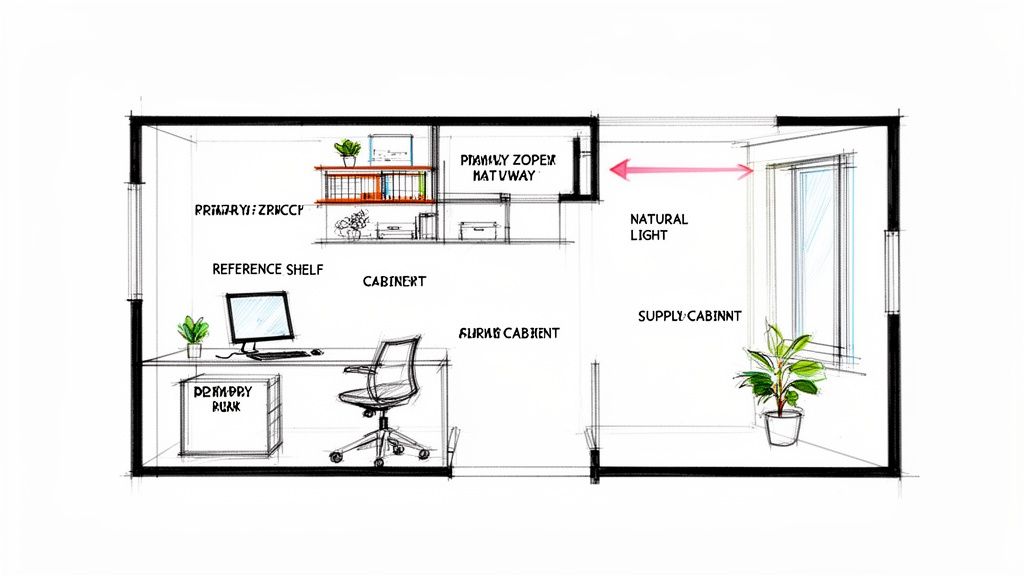
The Primary Work Zone: This is your command center. We’re talking about your desk, your chair, your computer, and anything else you touch constantly all day long. This spot should be the most comfortable and easiest to get to in the entire room.
The Reference Zone: Think of this as your office library. It’s where you keep things you need, but not every five minutes. This could be your filing cabinet, bookshelves holding manuals or project binders, or storage for long-term client materials. You want it close enough to grab what you need without a hassle, but not so close that it’s crowding your main desk area.
The Supply Zone: This is mission control for all your office supplies—your printer, scanner, extra paper, pens, paper clips, you name it. Keeping all these items together means you’re not digging through three different drawers just to find a sticky note. It's a good practice to place this zone slightly out of the main path you walk through the room.
Pro Tip: Before you start moving furniture around, sketch out your ideas. Grab a piece of paper or use a simple online room planner. This lets you experiment with different layouts and see how your zones fit together without breaking your back. It's a small step that saves a lot of time and frustration later.
Practical Tips for Arranging Your Space
Once you know what your zones are, placing them strategically can make a huge difference in your focus and productivity. You want to create a layout that just feels right, removing any little annoyances that pull you out of your work.
Think about the natural flow of the room itself. If you can, place your desk where it gets good natural light, but be mindful of glare on your screen. Numerous studies show that natural light can boost your mood and productivity.
Also, consider the "work triangle" concept, just like in a kitchen. The path between your main desk (work zone), your filing cabinet (reference zone), and your printer (supply zone) should be short and clear. This kind of logical setup means fewer wasted steps and less time getting distracted, which helps the whole day feel more organized and less chaotic.
Choosing Furniture That Truly Solves Problems
Alright, you've decluttered, you've measured, and you have a solid layout in mind. Now it's time to select the furniture. This isn't just about filling the space. The goal is to choose pieces that actively solve your workflow problems.
Think of your furniture as the essential tools for your trade. You wouldn't use a wrench to hammer a nail, so why use a stiff dining chair for an eight-hour workday? Using the wrong tools leads to frustration, discomfort, and a messy process—exactly what we're trying to fix. The right desk, a truly supportive chair, and smart storage are the three pillars that will make or break your new home office.
Finding the Right Desk and Chair
Your desk is command central, so its size and shape need to align with how you actually work. Do you need to spread out blueprints and paperwork next to your dual monitors? An L-shaped desk could be a game-changer. If you’re working with a smaller footprint or want the health benefits of changing positions, a standing desk or a simple, compact writing desk might be a good fit.
The chair, however, is even more critical to your day-to-day well-being. Think about it: many office workers spend thousands of hours sitting every single year. From that perspective, an ergonomic chair isn't a luxury; it's a practical investment in your own health. Be sure to look for features like adjustable height, proper lumbar support, and armrests that can be set to the same height as your desk. A good chair doesn't just feel comfortable—it actively reduces strain and helps you stay focused.
Your home office furniture should be a solution, not a compromise. If your current chair causes back pain or your desk feels constantly cramped, it’s actively working against you. Investing in pieces designed for the work you do is an investment in your own productivity and comfort.
Smart Storage Is More Than Just Shelves
Good storage isn't just about stashing your stuff; it's about making things orderly and easy to find. Open shelving is great for books, binders, and a few decorative pieces you want to display. But for the less-sightly essentials—like reams of paper, extra cables, or ink cartridges—a cabinet with doors is helpful for hiding the chaos. And if you handle any important physical documents, a filing cabinet is still a must-have.
This little flowchart can help you think through how your specific work zone should influence your furniture choices.
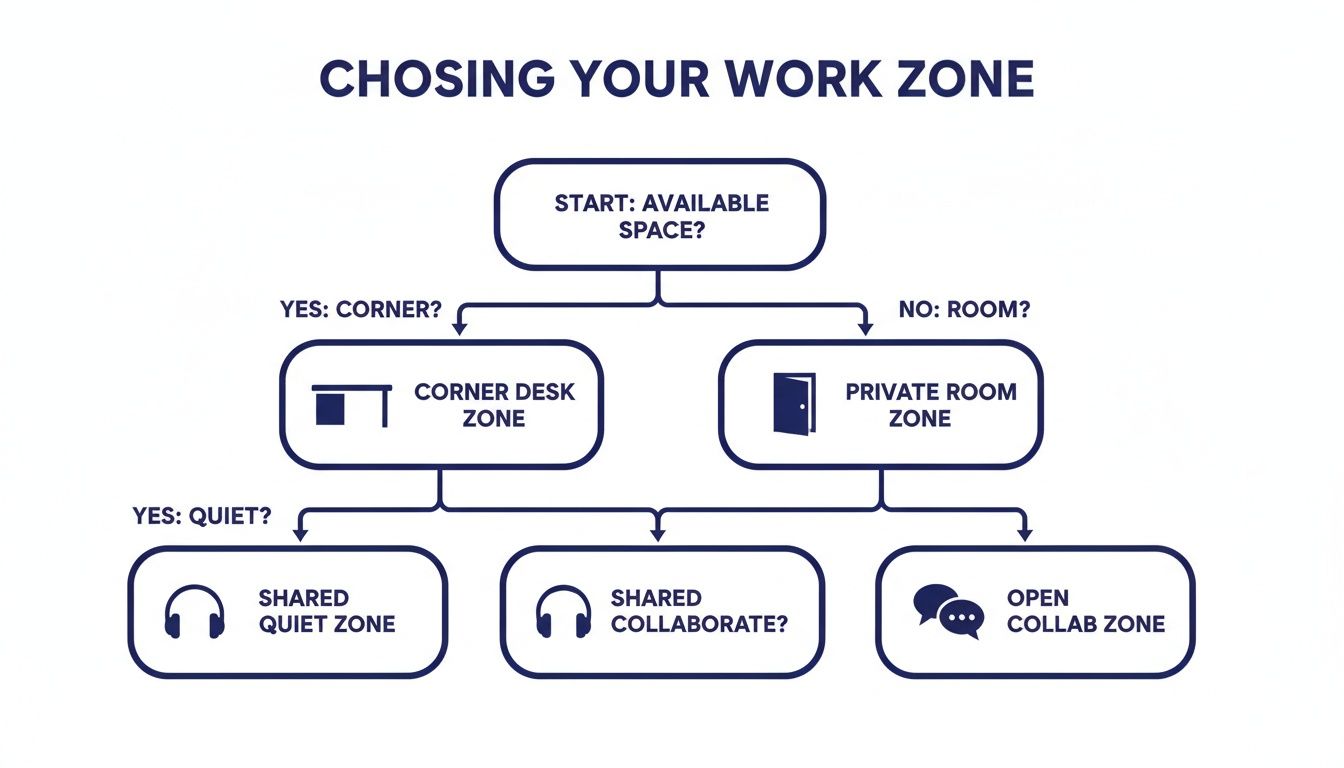
As you can see, whether you have a whole dedicated room or just a corner of the living room will point you toward different solutions. A dedicated space lets you prioritize function, while a shared zone means you need to be smarter about the footprint.
Also, don't forget to think vertically! Tall bookcases or modular shelving units are brilliant for maximizing storage without eating up precious floor space. They also draw the eye upward, which can make a smaller room feel bigger.
To help you get a clearer picture of what's out there, we've broken down a few common storage solutions and the problems they solve.
Home Office Storage Solutions Compared
| Storage Type | Best For | Space Consideration |
|---|---|---|
| Filing Cabinets | Keeping important documents, client files, and sensitive paperwork organized and secure. | Can be bulky; look for under-desk models or low-profile lateral files to save floor space. |
| Bookcases | Displaying books, binders, and decor. Keeping frequently used reference materials within arm's reach. | Tall, narrow designs are perfect for smaller rooms and making the most of vertical space. |
| Credenzas/Buffets | Hiding bulky items like printers and scanners, plus stashing office supplies behind closed doors. | Offers a large, useful surface for extra workspace or display area. A very versatile piece. |
| Cube Organizers | Highly flexible storage for supplies, project bins, books, or just about anything else. | Extremely customizable with fabric bins and inserts. They fit well in almost any space. |
By focusing on function first, you'll end up with a workspace that not only looks great but, more importantly, feels great to work in day after day. This is the final piece of the puzzle to creating an organized and productive home office.
Taming Cables and Mastering Ergonomics
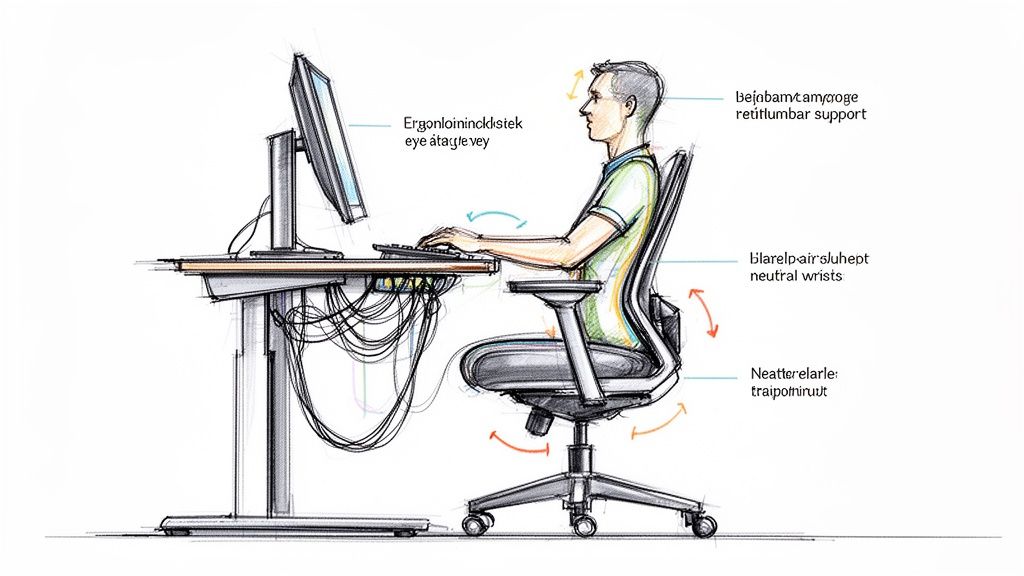
Okay, let's talk about the two issues that can undermine even the most perfectly planned home office: the cable mess under your desk and the slow-burn discomfort of bad posture.
You can have a beautiful desk and the perfect layout, but a messy web of cords makes a space feel unfinished and attracts dust. Worse yet, an improper ergonomic setup can lead to nagging neck, back, and wrist pain that completely drains your focus.
The good news? Fixing both of these problems is easier than you think and makes a massive difference in how your office feels and functions every single day.
Conquering Cable Chaos
That nest of wires lurking under your desk is more than just an eyesore. It’s a pain every time you need to unplug something and makes cleaning difficult. Taking just 30 minutes to wrangle them will make your whole workspace feel cleaner and more intentional.
Here are a few go-to tools for the job:
- Cable Ties or Velcro Straps: The simplest first step. Grouping related cords—like everything for your monitor—instantly calms the chaos.
- Cable Sleeves: These are fantastic. They’re basically fabric tubes that wrap around a whole bundle of cords, creating one clean channel from your desk to the outlet.
- Adhesive Cable Clips: These are great for running individual cords along the back edge of a desk or down a table leg. It keeps them completely invisible.
- Under-Desk Cable Tray: This is an excellent solution. It’s a small metal basket that screws to the underside of your desk, getting power strips and chunky adapters up off the floor entirely.
Just start by unplugging everything, perhaps labeling each cord so you know what's what, and then neatly route them back using one of these solutions. You'll be amazed at how much calmer the space feels.
Setting Up an Ergonomic Workstation
Ergonomics isn't some fancy buzzword that requires expensive gear. It’s simply about arranging your workspace to fit your body's natural posture, not forcing your body to fit your workspace. Many people deal with the consequences of poor ergonomics, and small tweaks can prevent long-term strain.
The goal here is to create a “neutral” body position, where your joints are all naturally aligned and not stressed.
A well-adjusted workspace reduces physical stress, which in turn frees up mental energy for your actual work. Think of it as removing a constant, low-level distraction you might not even realize is there.
Run through this quick checklist to get your setup dialed in for comfort:
- Monitor Height: The top of your screen should be at or just a smidge below eye level. You shouldn’t have to look up or crane your neck down to see. If it's too low, a monitor stand or even a stack of sturdy books works wonders.
- Chair Position: Sit all the way back in your chair so your lower back is supported. Your feet should be flat on the floor with your knees at roughly a 90-degree angle. Adjust your chair height until your elbows are also at a 90-degree angle when your hands are on the keyboard.
- Keyboard and Mouse: Keep them close. You should be able to use them with relaxed shoulders and your elbows near your body. If you're reaching way forward, you’re creating tension in your neck and shoulders that will build up over the day.
Making these small, intentional adjustments can completely change how you feel at the end of the workday. It transforms your office from just a place you work into a space that genuinely supports your well-being.
Keeping Your Newly Organized Workspace Tidy for the Long Haul
Let's be honest, organizing your home office is one thing. Keeping it that way is a whole different ballgame. The real victory isn't just the big initial purge—it's stopping that sneaky clutter from creeping back in.
The secret is to build a few simple, consistent habits that prevent those paper piles and tangled cords from ever taking root. You don't need to block off a whole Saturday every month for a massive overhaul. Instead, a few minutes each day combined with a quick weekly tune-up is all it takes to maintain that calm, productive space you worked so hard to create.
Nail the End-of-Day Reset
The single most effective habit you can build is the 5-minute end-of-day reset. Before you shut down your computer and officially clock out, take just a few moments to return your workspace to a clean slate.
- Clear Your Surfaces: Put away pens, notebooks, and any stray papers that have landed on your desk.
- Wipe It Down: A quick swipe removes dust and coffee rings.
- Sort the In-Tray: If you have a designated spot for incoming mail or notes, give it a quick sort.
- Straighten Up: Push in your chair, tidy your keyboard and mouse. It’s a small detail that makes a big difference.
This little ritual takes almost no time but pays off significantly. Walking into a clean, ready-to-go workspace in the morning can completely eliminate that feeling of starting the day already behind schedule.
Consistency is so much more important than perfection here. The goal isn't a sterile, magazine-shoot office; it's a functional space that requires minimal effort to keep up because you're tackling small messes before they can become big problems.
Carve Out Time for a Weekly Review
To back up your daily reset, schedule a short 15-minute weekly review. Think of this as your chance to handle the things that pile up over a few days, like filing new documents or restocking your printer paper.
Use this time to shred unnecessary paperwork, file away anything you've scanned, and just make sure your supply zone is prepped for the week ahead. By making these little routines a non-negotiable part of your schedule, you'll find that staying organized stops being a chore and simply becomes part of how you work.
Still Have Questions? Common Considerations for Home Offices
Even after you've got a game plan, a few questions can pop up right when you think you're finished. That's totally normal. Let's tackle a couple of the most common home office considerations.
How Can I Organize a Small Home Office Corner?
When you’re short on square footage, the only way to go is up. Think vertically.
Wall-mounted shelves, floating desks, and tall, skinny bookcases can give you tons of storage without eating up precious floor space. Then, for the desk itself, use organizers and drawer dividers to make sure every single inch is working for you.
What Are Some Budget-Friendly Organization Tips?
Getting organized doesn’t have to drain your wallet. Some of the best solutions are things you might already have.
Repurpose old jars or mugs to hold pens, scissors, and other supplies. You can find simple pegboards that give you a huge amount of flexible vertical storage. Even basic filing boxes can work wonders for stray papers. The real secret isn't buying expensive containers—it's creating a system that works for you.
Remember, the whole point of getting organized is to make your life easier and your work more efficient. It's not just about aesthetics; a tidy space genuinely makes you more productive. In fact, proven systems like '5S'—Sort, Set in order, Shine, Standardize, Sustain—have been shown to deliver 20-50% efficiency gains, a principle that works just as well at home. You can dig into more stats about how organization impacts remote work on yomly.com.
From figuring out the layout to picking a desk and chair, putting together a home office that you love to work in can be a really satisfying project.
If you hit a snag or just need some help finding the right furniture to solve your unique workspace challenges, our team at Woodstock Furniture & Mattress Outlet is here to help. Come on down to one of our showrooms and let's find the perfect home office solutions for you.
Leave a Reply
You must be logged in to post a comment.