Why do some home offices look perfectly put together and still make you want to leave after an hour?
Usually, the problem is not one big mistake. It is a collection of small frictions. A chair that feels fine at first, then stiff by midafternoon. Light that is bright enough to see, but too harsh to relax into. A room that technically works, yet keeps asking your brain to work harder than it should. That distinction is important because cozy is not just a style choice. In a home office, cozy often supports productivity by reducing the background stress that leads to burnout, distraction, and physical discomfort.
A cozy office works like a well-fitted sweater. It does not distract you from the day. It helps you settle in, stay comfortable, and keep your attention on the work instead of the room. In practical terms, that can mean softer lighting, warmer materials, less echo, better storage, and a seat you can use for real work hours.
Remote work pushed many people to carve offices out of bedrooms, living rooms, and spare corners. As that shift became more common, features like rugs, plants, textured fabrics, and warmer light stopped being just decorative extras. They started solving real problems at home, including glare, noise, visual clutter, and the drained feeling that comes from sitting in a space that feels too cold or temporary.
To begin, ask a simple question: What in your current workspace makes it harder to focus or feel at ease? The ideas below connect comfort to performance in clear, usable ways, from lighting and sound control to storage and seating. For visual inspiration around embracing digital comfort, it also helps to notice how atmosphere shapes behavior.
1. Layer Warm, Dimmable Lighting
Why does a room that looks fine in daylight suddenly feel draining at 3 p.m.? In many home offices, the answer is lighting.
One overhead fixture often does too much and too little at the same time. It brightens the whole room, but it can also flatten the space, bounce glare off your screen, and keep your body in a harsh, alert mode for longer than your work really needs. That matters because cozy lighting is not just about mood. It can help reduce eye strain, lower that sterile feeling that wears you down, and make it easier to stay focused through a full workday.
A layered setup works like lighting in a good living room. You want general light, focused light, and softer background light, each with a job to do.

What that looks like in a real room
Start with ambient light. That is your base layer, such as a ceiling fixture or floor lamp that keeps the room bright enough to work safely and comfortably. Then add task lighting, usually a desk lamp, so your eyes are not working as hard during reading, writing, or paperwork. Finally, add one softer accent light, such as a shaded lamp on a shelf or console, to take the edge off the room.
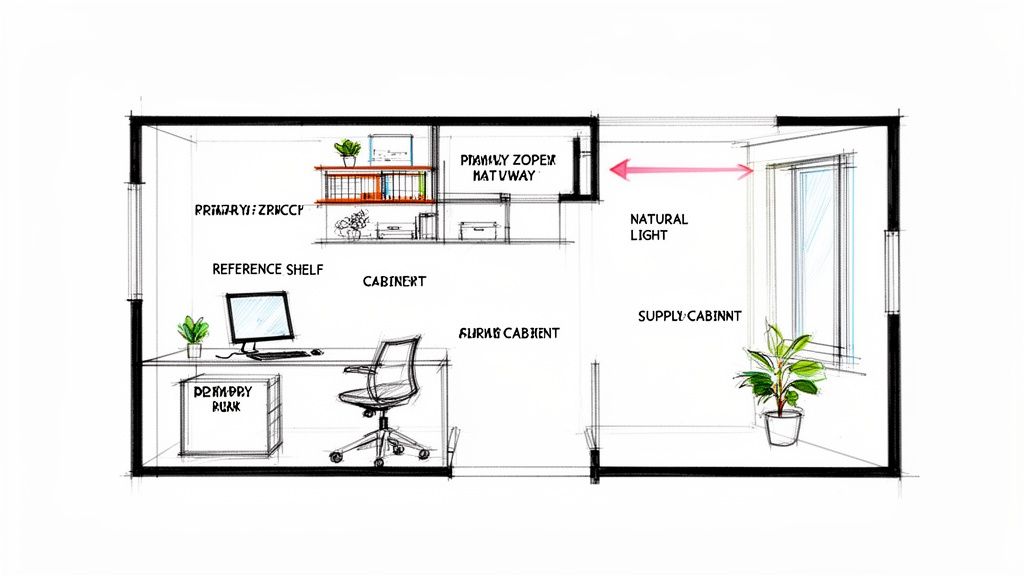
If your desk is in a guest room, a simple combination often works well: overhead light for setup and cleaning, a desk lamp for active work, and a corner floor lamp for the rest of the day. If your workspace sits in a bedroom or living room, warmer lamp light helps the office feel like part of the home instead of a leftover corner with a laptop in it.
Practical rule: If you only have one light source now, buy one lamp before you buy more decor.
A dimmable bulb gives you control over energy and focus. Use brighter light in the morning when you need to read clearly and get mentally started. Lower it later for calls, planning, or end-of-day admin. That small shift tells your brain the room can support different kinds of work, which often makes long hours feel less tiring and more sustainable.
2. Incorporate Natural Wood and Textures
Why do some home offices look tidy but still feel draining after a few hours?
A big reason is material overload. If your desk area is all metal, plastic, glass, and flat laminate, your brain keeps reading the space as hard and utilitarian. That can make work feel more clinical than calm, even if everything is organized.
Natural wood helps soften that signal. Wood grain adds visual warmth, and warmth matters for productivity because people tend to settle in faster and stay comfortable longer in spaces that feel inviting. In practical terms, a room that feels less sterile is often a room where it is easier to focus, take fewer avoidance breaks, and finish tasks without that low-level urge to escape the desk.
Where texture helps most
Start with one anchor piece. A wood desk, a bookcase with visible grain, or a small oak-toned file cabinet can do the job. You do not need a full matching set. In fact, too much matching can make a room feel stiff again.
Then add texture the way you would add insulation to a room. It reduces the coldness of hard surfaces. A woven basket for papers, a linen lampshade, an upholstered guest chair, or a soft throw over the back of your seat can all make the office feel more settled.
Here is a simple comparison. A black metal desk with exposed cords and a plastic drawer unit can work perfectly well, but it often feels temporary. A compact wood desk with a fabric pinboard and one woven basket holds the same supplies and usually feels calmer to sit down to each morning.
A few easy rules help:
- Choose wood tones that fit the rest of the home: Light and mid-tone woods usually blend more easily into bedrooms, living rooms, and guest rooms.
- Use texture on touchpoints: Chairs, baskets, lampshades, and storage pieces are the easiest places to add softness.
- Mix, do not overmatch: One or two wood pieces and a few fabric elements are often enough to change the mood of the space.
- Keep it functional: Texture should warm the room, not crowd the desk or collect unnecessary clutter.
If your office feels efficient but a little emotionally flat, this is often the fix. Cozy materials are not just decorative. They help the workspace feel more human, and a workspace that feels good to enter is usually easier to use well.
3. Define the Zone with a Soft Area Rug
What makes a work corner feel like a real office instead of a desk that drifted into the room? In many homes, it is the boundary.
If your workspace sits in a bedroom, living room, loft, or hallway, your brain keeps reading the area as part of everything else. That can make it harder to focus during the day and harder to switch off at night. A soft area rug helps create a clear edge around work, which makes the space feel calmer and easier to use with intention.
A rug works like a frame around a picture. It groups the desk, chair, and nearby storage into one visual unit, even if the office only occupies a single wall. That simple cue can reduce the scattered feeling that often leads to distraction.
There is also a comfort benefit. Hard flooring can feel cold and slightly harsh over a full workday, especially if you shift positions, stand up often, or work in socks. A rug adds warmth underfoot and softens some of the echo that bare floors can create during calls.
That combination matters for productivity. Cozy is not only about appearance. When a workspace feels physically warmer, visually quieter, and more clearly defined, it often becomes easier to settle into work without that low-level irritation that drains attention.
A rug doesn't have to fill the room. It just has to visually hold the desk, chair, and immediate work area together.
Worried about your chair getting stuck? Choose a low-pile rug, a flatweave, or place the rug under the front half of the desk so the chair can still roll on the hard floor behind it. This is often the easiest setup in a bedroom office, where you want softness near your feet without adding friction to every movement.
Size matters more than many people expect. A rug that is too small can make the area feel accidental, while one that anchors the main work pieces usually makes the setup feel finished. If you are already planning to add greenery later, The Cactus Outlet's office plant recommendations pair especially well with rug-defined office corners because both help a mixed-use room feel grounded and intentional.
A good rug also helps with the end of the day. Once work is over, the office still looks contained instead of spilling into the rest of the room. That visual separation can make it easier to mentally leave work, which is a real advantage if burnout and blurred home-work boundaries are part of the problem.
4. Weave in Meaningful Decor and Storage
A cozy office shouldn't feel sterile. It also shouldn't feel like every object you own is on display. The balance is personal items where you can see them, with enough closed storage to hide the less attractive parts of work.
Open shelving works best for things you'd be happy to see every day. Framed photos, a favorite mug, a few books, a ceramic bowl for paper clips, or one small plant. Closed storage handles charging cables, spare notebooks, returns, files, and all the little items that create visual stress.
A simple mix that works
Try the one-third rule. Keep roughly one-third of visible surfaces decorative, one-third functional, and one-third empty. Empty space matters because it gives your eyes a place to rest.
If you want personality without clutter, a narrow bookcase with baskets on the lower shelves and display items above often works better than trying to style the desktop itself. That keeps your work surface open while still making the office feel like part of your home.
For readers who want greenery as part of that mix, The Cactus Outlet's office plant recommendations can help you choose plants that suit indoor workspaces.
- Use closed storage for ugly essentials: Routers, extra cords, sticky notes, and printer paper belong behind a door or in a basket.
- Display what supports your mood: Art, family photos, a meaningful object, or a notebook you use often.
- Edit often: If every shelf is full, the room won't read as calm.
The best cozy office ideas usually make a room feel personal without asking your eyes to process too much.
5. Add Life with Indoor Plants
Why do so many home offices feel flat after a few hours, even when they're clean and organized? One common reason is that the room has no living element. A plant adds shape, color, and a little movement to a space filled with hard edges, screens, and office equipment.
That change is not only visual. It can help the room feel less sterile and less mentally tiring. If your workspace feels like a box, your attention often starts to wander or your energy drops sooner. A bit of greenery can soften that effect and make long work sessions feel easier to stay with.
The goal is not to turn your office into a jungle. A cozy office works best when plants support focus instead of competing for space, light, and care.
How plants help a workspace feel better to work in
Plants work like upholstered dining chairs in a room full of metal stools. They take the edge off. In a home office, that matters because visual harshness can add to the feeling of being “on” all day. Softer surroundings often make it easier to settle into work, especially if you spend hours alone at a desk.
A practical question comes up here. How many plants do you need? Usually, one to three is enough for a small office. More than that can start to feel busy, especially if your desk already holds monitors, notebooks, chargers, and task lighting.
A few placements tend to work well:
- Desk corner plant: Adds softness near your eyeline without crowding your keyboard area.
- Floor plant by a window: Fills an empty corner and gives the room some height.
- Small trailing plant on a shelf: Brings life upward when floor space is limited.
Choose plants that match your real habits, not your ideal ones. If you forget to water things, pick forgiving options. If your office gets only indirect light, buy for that condition. The right plant should lower stress, not create another chore on your list.
Even one healthy plant can make a compact office feel more human, which often helps with a problem many remote workers know well. Burnout grows faster in spaces that feel cold, repetitive, or disconnected from daily life. Greenery helps close that gap.
6. Prioritize a Truly Comfortable Chair
If your chair is wrong, the room will never feel cozy. You can have a beautiful lamp, a nice rug, and carefully styled shelves, but if your back, hips, or shoulders start complaining by noon, comfort disappears fast.
A good office chair supports the kind of work you do. Long typing sessions call for different support than occasional laptop use at a writing desk.

What to look for before you choose by appearance
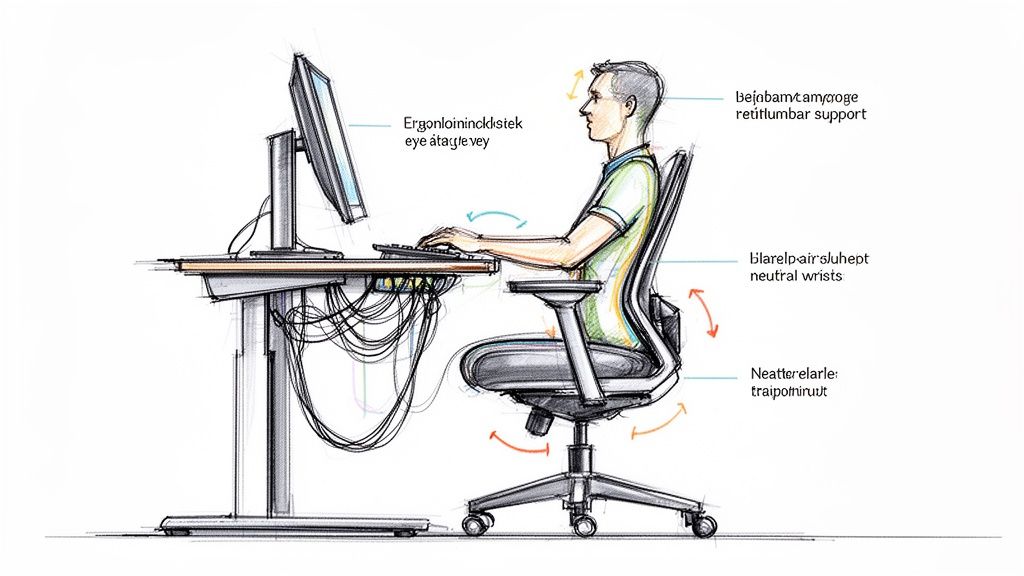
Start with fit and adjustability. You want a chair that lets your feet rest comfortably, supports your lower back, and gives your arms a natural place to land while typing. Upholstery can make a chair feel warmer visually, but support should come first.
A common real-world mistake is buying a dining chair because it looks charming in the room. That can work for short sessions. It usually doesn't work for full workdays.
The most productive chair often isn't the one with the trendiest silhouette. It's the one you stop noticing because your body isn't fighting it.
If your office doubles as a bedroom or den, look for a chair that blends with residential furniture but still offers practical adjustments. That middle ground often gives you the best result. Comfortable enough for real work. Soft enough to feel at home.
Among cozy office ideas, this is the one I'd treat as foundational. Solve for your body first, then style the rest around it.
7. Introduce a Third Place for Breaks
What happens when your desk has to do everything? It starts to carry too much mental weight. The place where you answer emails becomes the same place where you push through fatigue, stare at a difficult task, and eat a rushed lunch. Over time, that can make your office feel draining instead of supportive.
A third place solves that problem inside the room. In home design, a “third place” is a separate spot for a different mode of being. In a cozy office, that might be a small accent chair, a window seat, an upholstered bench, or even a cushioned corner with a side table. You are giving your brain a cue: desk for focused production, second spot for reset and reflection.

Why a separate seat helps your work
Cozy matters here because productivity is not only about discipline. It is also about recovery. A soft, inviting place to step away for ten minutes can reduce the boxed-in feeling that often leads to distraction or burnout during long work-from-home days.
The effect is practical. If you move out of your task chair to review notes, take a phone call, read a printed draft, or breathe for a minute, you break the “stuck at the desk” pattern. That small shift often helps people return to the screen with better focus.
A simple way to judge whether this idea fits your room is to ask one question: do I have somewhere to pause that is not my work chair? If the answer is no, your office may be missing a useful layer of comfort.
For many people, this seat does not need to be large. It needs to be easy to use. If it becomes a decorative corner that collects laundry, it will not help. Place it close enough that you can move there without effort, and add one supporting piece such as a small table, footstool, or reading lamp.
Cozy office ideas work best when they solve a problem. A third place helps with mental fatigue, gives your body a change in posture, and makes the room feel more human. That is good design doing two jobs at once.
8. Manage Light and Privacy with Soft Window Treatments
Does your office feel bright but somehow still tiring to work in? The problem is often not the window itself. It is the lack of control over the light and the feeling of exposure that comes with it.
Soft window treatments help solve both. They filter daylight, reduce screen glare, and add privacy in a way that makes the room feel calmer. That calm matters for productivity. If your eyes keep adjusting to harsh light or you feel distracted by a street view or a neighbor's window, your attention gets pulled away from work.
Place the desk with the window in mind
A window works like a dimmer you cannot adjust unless you add the right layer in front of it. Sheers, Roman shades, and curtains give you that layer. They let you keep the mood-boosting benefits of daylight without forcing you to accept every reflection, hot spot, or visual distraction.
A simple question helps here. Is the light helping you focus, or fighting your screen?
If your monitor faces strong direct sun, filtered fabric can soften the brightness and make the screen easier to read. If the window sits behind the monitor, reducing contrast often makes the whole setup feel easier on your eyes during long work sessions. In a room that faces a sidewalk, driveway, or nearby home, fuller panels can create just enough privacy to help you settle in and stay on task.
Here is the practical breakdown:
- Sheers diffuse light: A good choice if you want daylight but less glare.
- Roman shades give cleaner control: Useful when you want a precise look and adjustable coverage.
- Heavier drapes add privacy and softness: Helpful in bedrooms, shared spaces, or street-facing rooms.
- Layered treatments give you options: Light filtering during the day, more coverage when you need it.
There is also an emotional side to this choice. Bare blinds can make a workspace feel temporary or sharp. Fabric softens the edges of the room, much like a rug softens a hard floor. That visual warmth can make your office more inviting, which means you are more likely to use it well instead of avoiding it, drifting to the couch, or feeling restless at your desk.
Cozy office ideas work best when they remove friction. Window treatments achieve this by helping your space feel private, comfortable, and easier to work in for hours at a time.
9. Control Sound for Better Focus
Noise is one of the least visible office problems, which is why people often ignore it until they're already frustrated. A room can look calm and still sound distracting. Echo from bare walls, footsteps in the hall, traffic outside, or household activity nearby can all break concentration.
Acoustic comfort deserves a place in any serious list of cozy office ideas because it connects directly to focus. Office design guidance notes that noise can reduce task performance, which is why sound-absorbing materials, zoning, and quieter breakout areas are practical tools, not just finishing touches, in this overview of cozy office design and acoustic comfort.
Small fixes that change the feel of a room
You don't need a studio-style buildout. Start with surfaces that soften sound. A rug underfoot, curtains on the window, upholstered seating, and even a fabric wall panel can reduce that hollow, bouncy feeling some home offices have.
If your workspace sits in a shared room, use furniture to create a soft boundary. A bookcase behind the desk, a curtain divider, or an upholstered chair near the office zone can help absorb some sound while making the area feel more enclosed.
Quiet doesn't always mean silent. It means fewer interruptions your brain has to filter all day.
That's often the missing link between a pretty office and one that supports deep work.
10. Keep Cords and Cables Tamed
Why does a room still feel busy even after you've cleaned the desk? In many home offices, the answer is cable clutter. A visible power strip, loose charging cords, and tangled monitor wires create visual noise. Your brain keeps registering that mess in the background, which makes it harder to settle in and focus.
That matters even more when your office shares space with daily life. If your desk is in a bedroom, living room, or guest room, exposed cords make the work zone feel permanent. A cleaner setup helps the room switch roles more easily, and that makes it easier for you to switch roles too. Cozy supports productivity here in a very practical way. Less visual distraction during work. Less mental spillover after work.
A simple way to look at it is this: cables are like the backstage area of your office. You need them, but you do not want them pulling attention from the part of the room meant to feel calm and comfortable.
Create order at the source
Start where clutter begins. Instead of waiting for cords to drop to the floor and tangle, give each one a path.
A few small fixes usually do the job:
- Mount the power strip under the desk: This gets the bulkiest piece off the floor and out of view.
- Group cords by job: Keep screen cables together, charging cables together, and anything you unplug often within easy reach.
- Use a cable box or basket: This hides adapters and extra slack without making them hard to access.
- Choose furniture with cord management: Desks with grommets, drawers, or rear cutouts make daily cleanup much easier.
If you are unsure where to begin, start with the cord you notice first every day. That is often the one creating the most friction. Fix one problem cable, then the next. You do not need a perfect setup to feel the difference.
This is one of the fastest ways to make a home office feel calmer, more intentional, and easier to use. Once cords are controlled, the room looks less like a temporary workstation and more like a place where focused work can happen.
Cozy Office: 10-Point Comparison
| Item | Implementation Complexity | Resource Requirements | Expected Outcomes | Ideal Use Cases | Key Advantages |
|---|---|---|---|---|---|
| 1. Layer Warm, Dimmable Lighting | Medium, requires multiple fixtures and dimming controls | Ambient, task and accent lamps; warm (2700–3000K) bulbs; dimmers/shades | Reduced eye strain, flexible mood control | Home offices with harsh overhead light or frequent screen work | Improved visual comfort and adaptable atmosphere |
| 2. Incorporate Natural Wood and Textures | Low–Medium, furniture selection or replacement | Solid or veneered wood desk, textured textiles (jute, linen) | Warmer, grounded aesthetic and tactile comfort | Cold or disconnected rooms needing a focal piece | Durable, cohesive warmth and natural character |
| 3. Define the Zone with a Soft Area Rug | Low, single item placement and sizing | Low-to-medium pile rug (5'x7'–6'x9'), neutral palette | Visual workspace definition, sound absorption, warmth | Open-plan rooms or corner workspaces | Quick visual impact, acoustic and thermal benefits |
| 4. Weave in Meaningful Decor & Storage | Medium, curation plus storage planning | Shelving, closed storage, boxes, personal decor items | Less visible clutter, personalized and motivating space | Cluttered or impersonal offices needing organization | Balances function and personality; easier access to essentials |
| 5. Add Life with Indoor Plants | Low, selection and basic care | Mix of floor, trailing, and desk plants; pots/stands | Reduced stress, improved mood and air quality | Stuffy or sterile spaces; desire for biophilic elements | High impact for low cost; boosts well-being and aesthetics |
| 6. Prioritize a Truly Comfortable Chair | Medium, fitting and testing required | Ergonomic task chair with lumbar, adjustability; moderate–high cost | Reduced discomfort, better posture, increased productivity | Long-duration sitters and those with back/neck issues | Biggest single impact on comfort and long-term health |
| 7. Introduce a 'Third Place' for Breaks | Low–Medium, add compact seating and a surface | Accent chair or ottoman, small side table, lamp | Encourages breaks, varied thinking modes, reduced fatigue | Small rooms needing movement or larger rooms with reading nooks | Promotes rest and mental shifts; multi-functional seating |
| 8. Manage Light and Privacy with Soft Window Treatments | Low, install curtains/shades | Sheer and opaque curtains, top-down shades, rods | Reduced glare, adjustable privacy, softened natural light | Rooms with glare, exposed windows, or privacy concerns | Flexible daylight control and visual softness |
| 9. Control Sound for Better Focus | Medium, combine multiple soft elements | Rugs, heavy curtains, upholstered furniture, pinboards, bookshelves | Lower noise, reduced echo, improved concentration | Noisy homes, shared walls, echo-prone rooms | Creates a quieter workspace using decor and furniture |
| 10. Keep Cords and Cables Tamed | Low, simple organization steps | Cable clips, covers, under-desk surge protector, grommeted desks | Cleaner appearance, reduced visual clutter and hazards | Any tech-heavy workspace or aesthetic-focused setup | Immediate tidy result; improves safety and calmness |
Your Cozy and Productive Workspace Awaits
A cozy office isn't about making work feel less serious. It's about making the space support the kind of work you need to do every day. When lighting is easier on your eyes, the chair supports your body, the room is quieter, and clutter is under control, focus comes with less effort.
That's the connection between comfort and productivity. People often assume productivity comes from stricter systems, better apps, or more discipline. Sometimes it does. But often, the bigger issue is that the room itself keeps asking too much from you. It's too bright, too noisy, too cold, too messy, or too uncomfortable. Cozy office ideas solve those friction points in ways that are visible and practical.
If you're not sure where to begin, start with the problem you feel most often. If you end the day with a sore back, focus on the chair. If your room feels harsh, work on lighting and soft materials. If your office spills into the rest of your home, look at storage, rugs, and cable control first. Small changes usually work better than trying to redesign everything at once.
It also helps to remember that a cozy office doesn't need a dedicated room. Many people are working from a guest room, a bedroom wall, a loft landing, or the corner of a living room. In those spaces, the most useful furniture often isn't just a desk and chair. It's the rug that defines the zone, the storage that hides visual clutter, the curtains that soften the light, and the accent chair that gives you a second place to think.
If you want to test pieces in person and see how different finishes, storage styles, and seating options might work together, a showroom visit can be useful. Woodstock Furniture & Mattress Outlet is one option for shoppers who want to explore home office furniture, desks, chairs, storage, and accent pieces in a more hands-on way. Speaking with knowledgeable staff can also help if you're trying to balance comfort, room size, and everyday function in one space.
The best office is rarely the most formal one. It's the one you can settle into, work well in, and still enjoy being around by the end of the day.
If you're building a home workspace in North Georgia, Woodstock Furniture & Mattress Outlet is a practical place to explore desks, office chairs, storage pieces, and room accents in person. You can visit a showroom, compare styles and sizes, and talk with knowledgeable staff about creating an office that feels comfortable, organized, and realistic for your space.