Tag: ergonomic desk setup

  • Home Office Desk Setup: Measurements, Steps and Fixes

    Home Office Desk Setup: Measurements, Steps and Fixes

    A Posturite summary of workstation pain research reports that, in a 2025 survey of more than 6,000 office and homeworkers across Europe, 67% reported pain or discomfort they attributed to their workstation setup. Bad posture and furniture that would not adjust were the most commonly named causes, according to the Posturite research summary. A better fit often starts with measurements and adjustments to the desk, chair, screen and keyboard you already have.

    Treat the desk as one part of a connected system. Adjust the chair first, then position the screen and keyboard around your seated posture. This sequence helps you find low-cost fixes for a shared room, a rental or a kitchen-table workspace before deciding whether new furniture would solve the problem.

    Why Desk Setup Matters for Daily Work

    The U.S. Bureau of Labor Statistics found that in 2024 about 33% of employed people who worked on a given day did at least some work at home, compared with 35% in 2023, in its American Time Use Survey release. One in three isn't a niche arrangement. It means the desk in a spare room or the end of a kitchen counter gets used most weekdays by someone who has to concentrate.

    That changes how the space should be planned. An occasional laptop perch can be a sofa. A daily workstation needs room for a monitor, a keyboard, documents, lighting and storage without taking over the room it sits in.

    Three decisions determine how well it works, and they come in this order:

    • Fit. The measurements that decide whether a desk and chair suit your body at all.
    • Position. The sequence for setting up seated posture so nothing is compensating for something else.
    • Layout and fixes. How light, screens, cables and storage get arranged in a room that has other jobs.

    This is written for renters and families who repurpose a dining table, a bedroom corner or a kitchen counter, and for anyone with a dedicated office who wants a plan rather than a shopping list. Before reading further, write down three numbers: the width and depth of the space you're considering, the height of your chair seat from the floor, and the height of your eyes from the floor when you sit in that chair. Those three settle most of what follows.

    Desk Measurements That Decide the Fit

    Copy this into a note and check each row against the desk and chair you already have. The mismatch you find is the thing to fix, and it usually isn't the whole desk.

    Measurement Reference value What it decides
    Monitor distance from eyes At least 20 in (50 cm) Desk depth and whether the screen can sit at a comfortable distance
    Monitor viewing range 20 to 40 in General preferred range when choosing a screen position
    Seated keyboard height 22 to 30 in Chair height and whether elbows stay near the torso
    Standing keyboard height (sit-stand desk) 36 to 46.5 in Whether a height-adjustable desk reaches a standing position
    Leg clearance under desktop 20 to 28 in (50 to 72 cm) Whether drawers, frames or modesty panels block the legs
    Monitor top height At or slightly below eye level Whether the head stays level without neck extension

    The U.S. Occupational Safety and Health Administration puts the minimum monitor distance at 20 inches, or 50 centimeters, and describes 20 to 40 inches as the general preferred viewing range, in its guidance on computer workstation desks. The same guidance names roughly 20 to 28 inches, or 50 to 72 centimeters, as the recommended leg clearance beneath a desktop, and encourages height-adjustable desks where possible.

    Depth is measured from your eyes, not from the desk edge

    A 20-inch minimum is a distance between two things: your eyes and the screen face. Desk depth is only a proxy for it. Say your desk is 24 inches deep and you sit upright with your eyes about 10 inches behind the front edge. The front of the monitor sits roughly 6 inches forward of the back edge, which leaves about 8 inches of gap. That's well short of 20, and no posture trick fixes it. Your options are a deeper surface, a monitor arm that lets the screen sit back over the rear edge, or pulling your chair back and losing surface for the keyboard.

    Work the sum with your own body before you shop, using your eye height and the chair you own.

    Height is set by your elbows, not by the catalogue

    The 22-to-30-inch seated keyboard range is wide because people are different sizes. The useful target is elbow height: elbows near the torso at roughly 90 to 100 degrees, forearms roughly level. A sit-stand desk that tops out around 36 to 46.5 inches at the keyboard is what lets you stand and keep that same relationship. If the number you need isn't in the desk's adjustment range, the desk is wrong for you however good it looks.

    Clearance decides whether you sit square to the desk

    Knees and thighs need a clear tunnel. A drawer stack, a modesty panel or a chunky frame can force you to sit slightly sideways with your legs angled, which twists the pelvis and takes the shoulders with it. Measure the clear space under the surface, not the total desk height.

    Set Up the Seated Position in Five Steps

    Set the chair first, the keyboard second, the monitor third. Reversing that order is the most common reason a home office desk setup never feels right. You raise the screen to compensate for a low chair, push the keyboard forward to compensate for a shallow surface, and spend the day holding a posture rather than sitting in one.

    These five steps start with the chair and feet because every later measurement depends on where your body ends up.
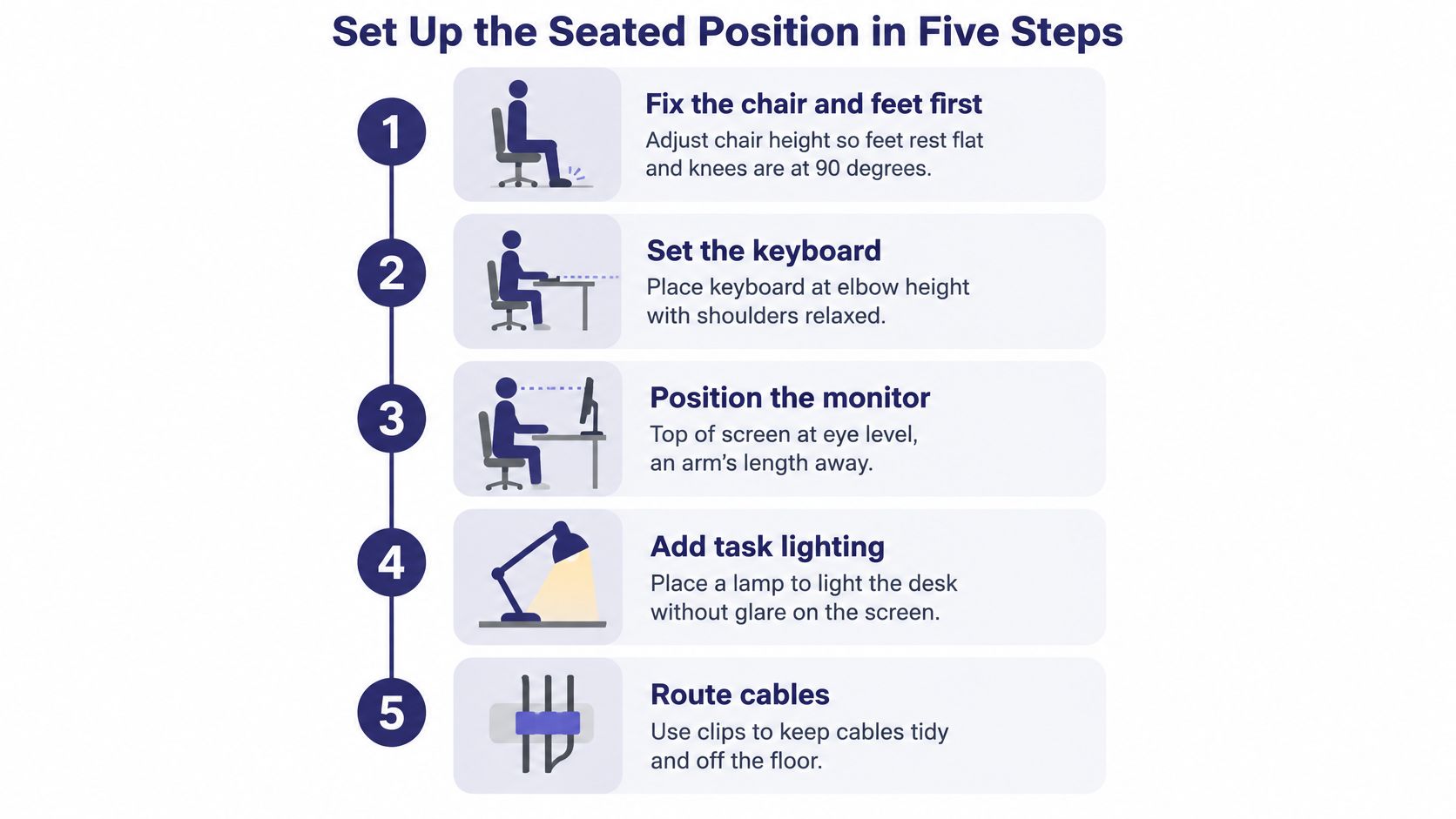
    An infographic illustrating five easy steps for setting up an ergonomic home office seated desk position.

    1. Confirm the surface is deep enough. Use the monitor distance from the reference table. A shallow top is the usual reason a screen ends up too close, and it's cheaper to solve with a monitor arm than with a new desk in many rooms.
    2. Sit with feet and back supported. Feet flat or on a footrest, back against the chair. Common slip: adjusting the keyboard before the chair, which leaves you reaching down or up all day without noticing why.
    3. Bring the keyboard to elbow height. Elbows near the torso at about 90 to 100 degrees. OSHA's workstation purchasing guide gives a keyboard height of 22 to 30 inches for seated work and 36 to 46.5 inches standing. Common slip: a keyboard pushed too far back, so the shoulders round forward to reach it.
    4. Put the primary monitor squarely in front of you. Not angled toward the middle of the room, not offset to make space for a notebook. Straight ahead of the position you sit in most of the day.
    5. Set the top of the screen at or slightly below eye level. Common slip: a monitor perched high on books or a stand, which tips the head back and shortens the neck.

    Quick check: sit exactly as you normally sit, raise one arm straight out, and touch the screen. If your fingertips reach the glass without leaning, the distance is close. If you have to stretch or duck forward, it isn't.

    A sit-stand desk changes one thing only: it lets you reproduce the elbow-height relationship while standing. The practical target stays elbow height, not a fixed dimension printed on a spec sheet.

    A good result looks unremarkable. Feet supported, shoulders relaxed, screen readable without leaning forward or back, wrists flat. If the setup draws attention to itself, something is still compensating.

    Arrange Lights, Storage and Cables Around the Screen

    Once the primary monitor is in place, everything else gets arranged around it rather than next to it. Screen first, then light, then storage, then cables.
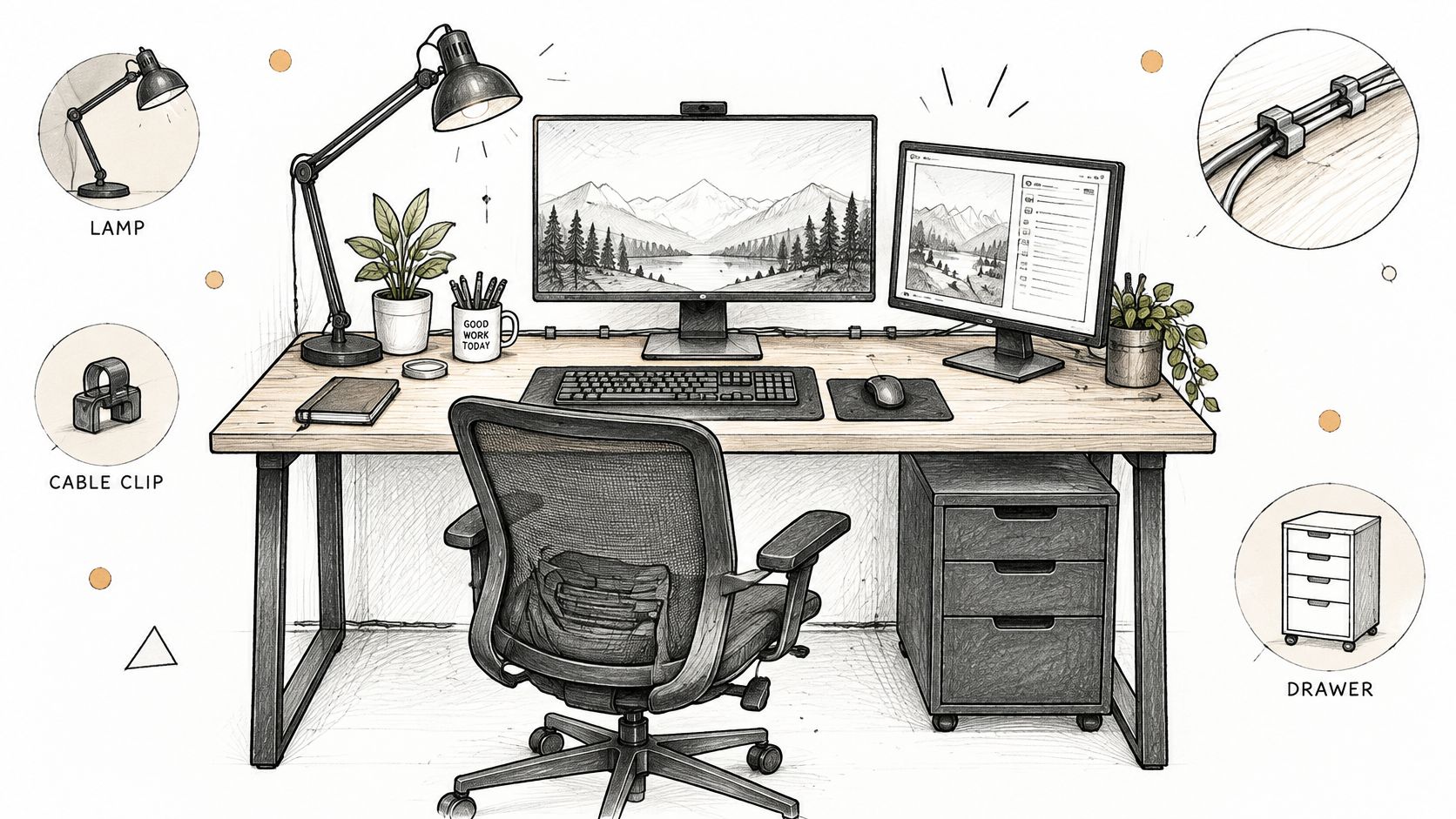
    A sketched illustration of an organized home office desk setup featuring a dual monitor, chair, and accessories.

    Put the second screen beside the primary one

    The OSHA monitor placement guidance is specific about this: the primary monitor should sit directly in front of the user, with additional screens positioned beside it. Centering the pair so the seam falls in the middle of your vision leaves the main screen off to one side, and you end up rotating your neck toward it hundreds of times a day. Decide which screen gets most of your attention, place that one dead ahead, and arrange the other around it. If both are used equally, put them side by side within a comfortable viewing angle so head movement stays small.

    Light from the side, not into the glass

    A task lamp should light the work surface, not the screen. Position it so the pool of light falls across the keyboard and any papers, with the shade below eye level so it doesn't shine into your face. For daylight, a monitor set roughly at right angles to a window usually reduces glare, because the bright surface stays out of your field of view. Room layout decides the exact arrangement, and blinds or a sheer curtain are the cheapest fix when the geometry won't cooperate.

    Storage within reach, cables out of sight

    Keep the notebook, phone and mouse inside the arc your hand covers without stretching. Everything used weekly rather than hourly can live in a drawer or on a shelf, and in a shared room, closed or lockable storage matters more than open shelving. For cables, run power and data along the back edge with clips or a tray, leave slack near the monitor so it can be raised or swivelled, and put the power strip somewhere you can reach without dragging the desk out.

    The last test is a reach audit. Sit in your usual position and check that mouse, keyboard, notebook and phone can all be reached without rolling the shoulder forward. Anything you have to lean for is in the wrong place by definition.

    Making a Kitchen Table or Shared Room Work

    A dining table isn't a desk, but it can be a workstation once you stop treating the laptop as the whole system. The goal is to borrow the surface without wrecking it for dinner.

    1. Measure the table and the seat together. Table height means nothing on its own. If the chair adjusts, set it so the keyboard lands in the seated range and your elbows stay near your torso. If the chair is fixed and the table is high, a cushion raises you; if the table is low, a footrest keeps your feet supported instead of dangling.
    2. Separate the screen from the keyboard. This is the single highest-value change at a shared table. A laptop alone on a low surface pulls your head and neck forward and down for hours. Put the laptop on a riser or a stack of books so the screen top sits near eye level, then add a compact external keyboard and mouse at elbow height.
    3. Decide what leaves the table when the workday ends. A monitor on a small stand, a laptop on a tray and a caddy for the keyboard and cables mean the surface clears in under a minute. Anything that takes longer than that stops happening by the second week.
    4. Set a two-minute reset. Keyboard and mouse into the caddy, cables coiled and clipped, notebook into a drawer or closet. The room returns to its other job, and you stop resenting the desk for taking it over.

    A fold-away table or a narrow desk suits a room with several uses, because you can measure its footprint against the walkway before you buy rather than after.

    Fix Pain and Clutter Without Replacing Furniture

    Most discomfort at a home desk traces back to one or two adjustable elements, not to the desk itself. The 2025 workstation pain research found that 37% of people working from home did not use a designated work desk, and that uncomfortable chairs or desks were blamed 10 percentage points more often at home than in the office. When the surface is a kitchen table, the chair is a dining chair and nothing adjusts, that gap makes sense.

    Symptom Likely cause Fix
    Neck strain by late afternoon Monitor too high or centred on the wrong screen Lower the top of the screen to eye level and place the primary monitor directly in front
    Wrist or hand discomfort Keyboard too high or too far from the body Bring the keyboard closer so elbows stay near the torso at about 90 to 100 degrees
    Shoulder tension Keyboard sitting above elbow level Lower the keyboard or raise the chair, and use a footrest if the feet dangle
    Legs cramped or blocked Desk frame or drawer under the desktop Clear the space under the desk or choose a desk with more leg clearance
    Eye strain or headaches Screen glare or brightness too high Adjust monitor angle away from direct light and add task lighting

    Sort the fixes by how long they take to judge. Same-day adjustments include lowering the screen, pulling the keyboard closer, adding a footrest or cushion, and turning the monitor away from direct light. You'll know within an hour whether they help.

    Week-long trials cover anything that changes the furniture: a different chair, a different desk height, a laptop riser with an external keyboard. Three days isn't enough, because a new position feels unfamiliar before it feels better. Give each change a week of real working days before you judge it.

    Keep a short log for two weeks: the time discomfort starts, where it sits, and what you changed the day before. A pattern beats a guess, and it stops you buying a third chair to solve a monitor problem.

    Plan the Desk Zone Before You Buy

    Before choosing a desk, check how the chair, screen and keyboard will fit together in the room. Measure the available space, then use these four details to compare options:

    1. Desk footprint and walkway. Measure the desk width and depth, the space the chair needs to roll back, and the path past it. Mark the proposed footprint with tape and walk around it.
    2. Chair seat height and adjustment. The seat height affects where your elbows meet the desktop, so check whether the chair can adjust to a comfortable working position.
    3. Monitor size and number of screens. A second screen takes up more width and needs a layout that keeps the primary display in front of you.
    4. Daily clearing or permanent setup. If the desk must be cleared after work, consider how easily the keyboard, screen and other items can be moved or stored.

    In a tight room, a smaller desk with cable management may leave more usable space than a large executive desk. A sit-stand model suits a setup where you expect to change position during the day; a fixed desk may be a better fit if the chair and keyboard already sit at comfortable heights and the arrangement will stay put.

    Sit at a desk before buying it. Check the height, knee clearance and cable access in person, since each affects how the chair, screen and keyboard work as a set.

    Woodstock Furniture & Mattress Outlet offers design services to help plan a desk in a room that serves more than one purpose. It also sells furniture, mattresses and home décor, with delivery options for customers. Bring your measurements and try desks at a height that works with your chair. Visit a Woodstock Furniture & Mattress Outlet store in Woodstock/Acworth, Canton, Dallas/Hiram, Rome, Covington or Douglasville to see what's available and plan a visit.
  • Standing Desk vs Sitting: What the Research Actually Shows

    Standing Desk vs Sitting: What the Research Actually Shows

    Standing desks got popular because they sounded like the healthy answer to sitting. The research is less flattering to that simple story. A major 2024 Australian analysis of 83,013 adults found that standing more did not reduce cardiovascular risk compared with sitting, and that spending 12 or more hours per day combined in sitting or standing was linked to higher risks of heart disease, stroke, and heart failure WebMD summary of the Australian analysis. That shifts the core question from “Should I stand all day?” to “How do I avoid staying static for too long in either posture?”

    Question Sitting Standing
    Main strength Familiar, stable, easy for detail work Easier posture changes, can reduce some discomfort
    Main limitation Long uninterrupted sitting adds risk when it piles up Long uninterrupted standing also has trade-offs
    Best use Focused tasks, deep work, fine motor work Short work blocks, calls, reviewing, posture variation
    Biggest mistake Staying seated for hours without movement Treating standing as a replacement for movement

    The most useful way to think about standing desk vs sitting is not as a winner-takes-all choice. It's a question of how much you move, how well your workstation fits your body, and how long you stay locked in one position. The desk matters, but the habits around it matter more.

    The Standing Desk Debate Is More Complicated Than You Think

    The hardest part of this topic is that both camps oversimplify it. Sitting for long stretches is not harmless, but standing still for long stretches isn't a magic fix either. The Australian analysis above found that each additional hour of sitting beyond 10 hours per day was associated with a 15% higher risk of heart trouble and a 26% higher risk of orthostatic circulatory disease, while every extra 30 minutes of standing beyond 2 hours per day was linked to an 11% increase in orthostatic circulatory disease risk WebMD summary.

    What that means in plain language

    A standing desk doesn't automatically make the workday healthier. It can reduce the amount of time you sit, but if you respond by standing in place for hours, you may just be swapping one static posture for another. The evidence points toward less stationary time overall, not more time in one fixed position.

    Practical rule: the win comes from changing posture and moving more often, not from proving that standing is morally superior to sitting.

    That matters for remote workers because home offices make it easy to slide into long, uninterrupted blocks. A laptop on a dining table, a sofa, or a fixed desk can all create the same problem if you don't interrupt the posture. A sit-stand setup helps, but only if you use it to create variation rather than a new kind of endurance test.

    The conversation gets even clearer when you look at energy use. Harvard Health reported that sitting burned about 80 calories per hour and standing about 88 calories per hour, a difference of only 8 calories per hour. Harvard also calculated that 3 hours at a standing desk adds just 24 extra calories, roughly the calories in a carrot Harvard Health. That's useful because it strips away the fantasy that standing desks are a substitute for exercise.

    An infographic comparing health benefits and risks of sitting versus standing at a desk.

    A better question is whether the desk helps you move your body more naturally across the day. If it does, it's useful. If it just makes you stand still longer, the benefit gets much smaller.

    What Research Says About Sitting and Standing Health Effects

    The health story is a mix of small gains, real trade-offs, and a few myths that keep hanging around. Research does not support the idea that standing by itself is the healthier posture. It does support a more practical point, cutting down on uninterrupted sitting and adding movement can help some people feel better and, in some cases, improve measurable health markers.

    Calorie burn is real, but modest

    Harvard's numbers are a useful reality check. Sitting at a desk burned about 80 calories per hour, while standing burned about 88 calories per hour, a difference of 8 calories per hour Harvard Health. That is a real difference, but it is far smaller than the effect many people expect when they picture a standing desk as a passive fat-loss tool.

    The same Harvard summary noted that sit-stand desks can reduce workplace sitting by about 0.1 to 3.6 hours per day depending on the intervention. The furniture changes behavior, but the health payoff still depends on what you do with the extra time. If you use that shift to move around more, the desk is helping in a meaningful way. If you only trade sitting for motionless standing, the benefit gets much smaller.

    Some biomarkers improve when sitting is replaced with standing

    A workplace sit-stand intervention study on PMC found that replacing approximately 90 minutes of sitting with standing improved several cardiometabolic biomarkers, including vascular endothelial function, insulin resistance, and triglyceride levels, in healthy overweight and obese office-based employees PMC study. That matters because it goes beyond comfort and looks at body processes that shape long-term health.

    The later research adds an important correction. A WebMD summary of an Australian study reported that standing more did not reduce cardiovascular risk compared with sitting, and that excessive total stationary time in either posture was linked with higher risk WebMD summary. The useful lesson is simple, keep breaking up static time and keep moving. A standing desk is a tool for variation, not a promise that standing for long stretches will solve the problem.

    Circulation and discomfort deserve attention too

    There is also a practical side to the evidence. A CNN summary of a review reported that sit-stand desks were especially effective at reducing discomfort, including pain relief among people with chronic low back pain, obesity, and healthy adults, while not showing consistent harms to alertness or work performance CNN summary. That fits what many remote workers notice first, the posture change can make the day feel less punishing even when it does not turn into a dramatic fitness boost.

    The hidden detail most buyers miss is calibration. Sitting and standing are not the same setup, and each posture needs its own adjustment for screen height, keyboard position, and monitor distance. If you treat both positions as one arrangement, one of them usually ends up awkward. The key win comes from changing posture often enough that neither position has time to wear on the body in the same way.

    If you want a wider view of how passive calorie burn fits into a workday routine, the overview at BionicGym passive calorie solution gives a useful frame for why small increases in daily energy use rarely replace real movement. It is best used as context, not as a substitute for better work habits.

    Productivity and Cognitive Performance While Standing vs Sitting

    People often worry that standing will make them slower, and they sometimes hope it'll make them sharper. The evidence is more boring than the marketing. In controlled testing, standing doesn't appear to wreck short-burst knowledge work, but it also doesn't reliably supercharge it.

    Task performance stays mostly steady

    A controlled study comparing standing and sitting during reading-comprehension and creativity tasks found no significant differences in task performance, perceived difficulty, or perceived effort. The reading-comprehension sections took 15.83 minutes seated and 15.45 minutes standing, which is close enough to say the posture change didn't create a meaningful cognitive penalty in that setting PMC study.

    That's reassuring for remote workers who need to answer emails, review documents, or join calls without worrying that standing will make them sloppy. It also means standing isn't a secret productivity hack. The posture itself doesn't do the thinking for you.

    Plain takeaway: if your work is knowledge-based, the desk position is usually less important than comfort, attention span, and how often you take movement breaks.

    The strongest evidence points to discomfort, not output

    A Cochrane review found that sit-stand desks reduce occupational sitting by about 100 minutes per 8-hour workday on average and increase standing time by about 89 minutes per workday, but it found no apparent impact on work performance Cochrane Library. That's a useful distinction. The desk changes the physical pattern of the day, but the trials don't show a reliable throughput gain.

    That doesn't make the desk unhelpful. It means the business case for most home offices is usually comfort and sustainability, not raw output. If standing helps you stay focused because your back hurts less, that's a real benefit. If it creates a new source of fatigue, the gain disappears quickly.

    The practical middle ground

    Some tasks do feel easier in one posture than the other. Sitting often suits longer stretches of concentrated writing or detailed keyboard work. Standing can feel better for calls, quick reviews, and short bursts of admin. The point isn't to crown one posture as universally better, it's to match the posture to the task and keep switching before your body gets rigid.

    Ergonomic Setup Requirements for Both Postures

    This is the part most buyers miss. A sit-stand desk isn't one setup, it's two setups that share the same surface. If you don't calibrate both, you can end up solving one discomfort while creating another.

    Sitting and standing need separate measurements

    Ergonomics is about keeping your body in neutral positions, not about chasing a trendy desk height. In sitting mode, your chair height, monitor height, keyboard position, and lumbar support all matter. In standing mode, those same parts need fresh adjustment because your elbows, wrists, shoulders, and eyes are in different places relative to the desk.

    A good standing setup starts with the screen at eye level, the keyboard close enough that your elbows stay near 90 degrees, and your wrists stay neutral. If the monitor is too low, you'll bend your neck. If the keyboard is too high, your shoulders creep up and your forearms get tense. If the desk is too low, you'll hunch.

    The Canadian Centre for Occupational Health and Safety emphasizes that the goal is frequent posture changes, not standing indefinitely, and it lays out practical routines that range from 15 to 20 minutes of standing per hour to more frequent sit-stand-move cycles such as 20-8-2 CCOHS. That advice is useful because it shifts the focus from posture purity to comfort and variety.

    A standing desk is only part of the setup. The mat, footwear, monitor height, and chair all influence whether it feels good after the first hour.

    An infographic illustrating the correct posture and adjustments for an ergonomic standing desk workstation setup.

    The small accessories matter more than people expect

    An anti-fatigue mat helps soften the load on feet and legs. Supportive footwear matters too, because standing in soft slippers all day changes how pressure moves through your body. A footrest can also help when you want to shift weight instead of locking both knees.

    The biggest ergonomic mistake is assuming the desk alone will fix discomfort. It won't. The desk gives you the range, but the accessories and posture settings decide whether that range is useful.

    Ideal Sit-Stand Schedules and Transition Strategies

    The right schedule is the one you'll follow. You don't need a perfect routine, you need a repeatable one that stops you from getting stuck in one posture for half the day.

    Start with a rhythm, not a heroic goal

    The CCOHS guidance is a good anchor because it treats posture changes as a cycle. A simple working rhythm is to sit for about 50 minutes, then stand for 15 to 20 minutes, and add a 1 to 2 minute walk when you can. That keeps the body from settling into one shape for too long CCOHS.

    A few habits make that routine easier to keep:

    • Use task boundaries: stand when you finish an email batch or a document review, then sit for deeper writing or spreadsheet work.
    • Treat standing as active, not frozen: shift weight, change foot position, or step away briefly instead of locking your knees.
    • Keep the transition short at first: if your lower back or feet feel tired, shorten the standing block before you shorten the movement break.

    The Cochrane review's average change in sitting time, about 100 minutes per 8-hour day, is a reminder that desk systems do change behavior, but not into a full-day standing habit for many Cochrane Library. That's normal. You don't need all-day standing to get value from the desk.

    Avoid the two common mistakes

    The first mistake is standing too long on day one. The second is treating sitting as failure. Both are unhelpful. The goal is a flexible workday with more movement, not a contest between postures.

    A better transition strategy is to pair the desk with ordinary movement. Walk to refill water. Take calls while standing. Sit back down when your legs start telling you they've had enough. The body tends to respond well to those small shifts, especially if you're replacing a rigid routine with a flexible one.

    Key Desk Features and Accessories That Matter

    An adjustable desk only helps if it fits both postures you use. The hidden detail many buyers miss is that sitting and standing usually need separate setup checks, almost like two versions of the same workstation. A desk can be comfortable at one height and awkward at the other if the monitor, keyboard, and chair are not recalibrated for each position.

    Compare the parts that change daily experience

    Feature Why It Matters What to Look For
    Height range Determines whether the desk fits your sitting and standing posture A range that lets your elbows stay neutral in both positions
    Stability at full height Wobble becomes more noticeable when the desk is raised Solid frame design and reassuring feel during typing
    Programmable presets Makes switching between sitting and standing faster Memory buttons for your two main heights
    Adjustment speed Affects how often you're willing to change positions Smooth movement that doesn't interrupt your workflow
    Cable management Keeps cords from tugging during movement Tidy routing that doesn't snag when the desk rises
    Surface size Controls whether monitors, laptop, and accessories fit comfortably Enough room for your main work tools without crowding
    Weight capacity Helps the desk handle monitors and accessories safely Capacity suited to your full setup, not just an empty top

    These features matter because posture changes work best when they are easy to repeat. If switching takes effort, people stay in one position longer than they planned. If the desk shakes at standing height, they often stop standing even when their setup is otherwise sound.

    The accessories that complete the setup

    A monitor arm is often more useful than people expect, because it makes eye-level positioning easier in both sitting and standing modes. A keyboard tray can help in some setups, but only if it keeps the wrists neutral instead of pushing the hands into an awkward reach. An anti-fatigue mat matters if you stand for meaningful stretches, and a footrest can help you keep weight shifting instead of locking into one stance.

    Each accessory solves a different problem. A neck strain problem points to monitor height first. Sore feet point to the mat. Slow, awkward transitions point to presets or simpler controls. That order matters more than collecting the longest list of add-ons.

    The goal is not to build the most complicated desk setup. It is to make posture changes easy enough that you do them often, while giving each posture its own proper calibration. A desk with strong specs but poor stability or clumsy controls can be less useful than a simpler model that supports frequent movement without extra hassle.

    Choosing the Right Sit-Stand Solution for Your Home Office

    The right choice depends on the problem you're trying to solve. If your chair and desk setup already feel fine, a sit-stand desk may be a comfort upgrade rather than a necessity. If you're dealing with soreness, stiffness, or a workday that feels too static, the case gets stronger.

    A practical decision framework

    Start with your current pain points. If you feel better after a walk and worse after sitting for long stretches, a sit-stand setup is worth serious consideration. If you mostly need a cleaner monitor arrangement or better chair support, you might get more benefit from adjusting your seated ergonomics first.

    Then think about your work style. People who spend long blocks writing, coding, or editing often need a setup that makes switching easy but doesn't force standing all day. People who spend more time on calls, quick reviews, or alternating tasks may get more use from a desk that changes height often.

    Finally, test the desk in person if you can. Stability, height range, and control feel are hard to judge from a product page. A desk can look great online and still feel awkward once a monitor, keyboard, and daily work stack are on top of it.

    For shoppers in North Georgia, Woodstock Furniture & Mattress Outlet can be a helpful place to compare home office options with knowledgeable, experienced staff and see how different setups feel in person. That kind of hands-on comparison is useful when you're deciding between staying seated, adding a converter, or moving to a full sit-stand desk.


    If you're weighing a standing desk against a seated setup, Woodstock Furniture & Mattress Outlet can help you think through the trade-offs in a real room, not just on a product page. Visit Woodstock Furniture & Mattress Outlet to explore home office options and get practical guidance on a desk setup that fits how you work.